
TL;DR

Get business pricing on tools and workshop supplies
- Business-only prices and quantity discounts
- Tax-exempt purchasing
- Multiple users, one account, clear invoices
Jobsite security cameras can deter theft, document site activity, and help you check a project after hours when you match coverage, power, connectivity, storage, and monitoring to the actual site. Map entrances and valuable assets first, test footage and alerts day and night, and recheck the system as the site changes. Cameras add a layer of security; locks, lighting, access controls, privacy protections, and a named alert responder still matter.
A camera can send you a motion alert at 2 a.m. and still fail to show who drove through your gate. That gap between seeing activity and getting usable evidence is why jobsite security starts with a plan, not a shopping list.
This guide walks you through mapping risks, choosing cameras for rough site conditions, planning power and recording, and setting up a response to alerts. You’ll also get a practical installation and maintenance routine, plus reminders about worker privacy, data access, and when a licensed professional should handle electrical work.
Think of cameras as one layer in your site’s security, like a bright work light over the loading area: useful, but not a lock on the gate. Pair cameras with fencing, lighting, inventory controls, and access procedures, and you give your team a better chance to deter theft and understand what happened when something goes missing.
Map entrances, equipment and material storage, blind spots, lighting, and changing site layouts before deciding how many cameras you need.
Test image detail at the actual distance and at night; resolution alone does not show whether a person or vehicle can be identified.
Check power and signal at every camera position, and decide what recording continues during internet or power interruptions.
Name alert responders and backups, then review motion zones so routine deliveries or moving equipment do not bury useful notifications.
Post appropriate notice, protect private areas, restrict access to footage, and review accounts and retention settings regularly.
Field guide / Site security / 01
Guide to Installing and Maintaining Jobsite Security Cameras and Monitoring
A camera can send a motion alert at 2 a.m. and still fail to show who drove through your gate. Plan for usable coverage, dependable recording, and a clear response before you rely on the footage.
Map risk before picking camera locations
Mark gates, entrances, tool and material storage, parked equipment, blind spots, and incident areas. Decide whether each camera is meant to deter entry, show general activity, or capture identifying detail.
Prioritize the way in
A tighter view across a gate can capture faces or vehicle details that a broad yard view may miss. Use overlapping views where losing entrance coverage would leave a meaningful gap.
Expect the view to shift
Scaffolding, lifts, containers, and growing material stacks can quietly block a camera. Revisit positions and aim as access routes and valuable assets move through project phases.
Close the other gaps
Pair cameras with fencing, locks, perimeter lighting, inventory controls, and clear access procedures. Footage alone cannot secure a gate or notice a missing tool.
A wide camera can show where someone moved; a second, closer view across the gate may show who arrived. Both views need a clear angle, useful lighting, and no obstruction.
Rugged hardware, useful detail
Match protection, mounting, field of view, power, and connectivity to the actual camera position. Features matter only when the system can record the details you need in the conditions you face.
Test at the real distance
A wide lens covers more ground but can make distant people look small. A narrower view adds detail at a critical entrance while showing less of the surrounding site.
Check the hard hours
Test after sunset in rain, shadows, and the actual site lighting. A bright floodlight can turn a gate into silhouette; changing the angle or light may help more than higher resolution.
Keep the camera steady
Use secure, weatherproof mounts suited to dust, vibration, rain, and temperature extremes. Mains, battery, and solar options each need a plan for power interruptions and runtime.
Check signal where cameras sit
Wired systems can be dependable where protected cable routes are practical. Wireless systems are easier to move, but rely on signal and power. Check wired internet, cellular, or dedicated wireless coverage at each camera position.
Choose what stays in view
Fixed cameras continuously cover key areas. Pan-tilt-zoom cameras can inspect a wider area, but record only the direction they face. Keep a fixed view on high-priority entrances when needed.
Make alerts lead somewhere
Choose local, cloud, or combined storage. Set retention, access, and outage plans, then tune motion zones so useful events do not disappear among routine notifications.
Set the view, focus, and motion zones for the risk.
Choose storage and how long footage is kept.
Route alerts to a named person and backup.
Define covered hours and escalation steps.
Set who can contact site staff or emergency services.
Set a clear monitoring plan
- Name primary alert responders and backups.
- Define hours, incident escalation, and who acts next.
- Adjust motion detection to reduce alerts from weather, branches, or machinery.
- Know what recording continues when internet or power fails.
Protect workers and footage
- Inform workers, subcontractors, and visitors about camera use.
- Avoid private areas; check local rules on surveillance, audio, signs, and retention.
- Limit feed and recording access; use unique passwords and multifactor authentication.
- Update software and remove accounts when access is no longer needed.
Prove the system works before relying on it
Mount cameras high enough to discourage tampering, but low enough to preserve useful face and vehicle detail. Document locations and settings for authorized staff.
Keep coverage ready
A short, regular review catches shifted cameras, failed connections, and access changes before an incident exposes the gap.
Look for vibration, tampering, loosened brackets, or a changed view.
Confirm footage is clear, recorded, retrievable, and retained as planned.
Recheck signal, battery or solar runtime, cable protection, and outage behavior.
Test responders, remove outdated accounts, and review passwords and permissions.
Update views when equipment, materials, scaffolding, or routes move.
Keep notices, camera scope, footage access, and retention aligned with local rules.
Map the risks before you choose camera locations
Start a jobsite camera plan by marking the places where a camera could capture faces, vehicle details, or movement through an access point. Prioritize gates, entrances, tool and material storage, parked equipment, known blind spots, and areas with a history of incidents. A camera aimed at a broad stretch of gravel may show that someone was there, but a tighter view of the gate may show how they arrived. This distinction matters when deciding whether a camera is meant to discourage entry, show general activity, or provide details that could help establish who was involved.
Walk the site with a simple plan and note where fencing, buildings, lifts, scaffolding, or stored materials block a view. Construction sites change shape: the stack of plywood that sits low today can become a blind wall tomorrow. Mark camera locations, intended views, overlap at critical entrances, routes for power and network cables, and any areas where added lighting could improve a night image. Overlap can preserve a useful view if one camera is blocked or pointed away, but it also adds equipment, storage, and maintenance needs. Reserve it for entrances or assets where losing coverage would create a meaningful gap.
For example, imagine a renovation site with a vehicle gate on the east side and copper pipe stored beside the temporary office. One wide camera can watch general movement, but it may leave faces too small to identify. A second view aimed across the gate can give a clearer record of people and vehicles as they pass. The two views answer different questions: the wide view can show where someone went, while the closer gate view may reveal identifying detail. Neither is useful if glare, distance, or an obstruction hides the relevant moment.
Check the view at different times of day. Direct sun, bright security lights, shadows, rain, and reflective surfaces can wash out an image or hide detail. Revisit the plan as the job progresses; a new scaffold bay or a relocated container can quietly block the view you depended on. Treat each site phase as a potential change to the coverage plan, especially when valuable equipment moves or access routes shift.
Pair the camera plan with locks, perimeter lighting, fencing, inventory records, and clear access rules. Cameras may help construction teams deter theft and document site activity, but a feed that no one reviews cannot stop a damaged padlock or a missing tool. The site plan turns security into a working routine instead of a picture on a wall, and helps the team decide what to check when an alert or incident occurs.
Popular right now

Bose QuietComfort Wireless Bluetooth Headphones with Active Noise Cancellation, Mic, USB‑C Charging, Deep Bass, 24‑Hour Battery – White Smok

Bose QuietComfort Wireless Noise-Cancelling Over-Ear Headphones, Black

Apple AirPods Pro 3 Wireless Earbuds with Active Noise Cancellation
As an affiliate, we earn on qualifying purchases.
Choose cameras that can handle dust, weather, and real distances
Choose cameras for the conditions at the mounting point and the detail you need to see, not for a headline resolution alone. An outdoor camera needs suitable protection against rain and dust, a secure mount that resists vibration, and operating limits that match the site’s temperatures. The image must also show useful detail at the distance from the camera to the gate, storage area, or equipment. A higher-resolution image cannot recover details that are too small in the frame, blocked by an object, or lost in poor lighting.
Field of view creates a tradeoff. A wide lens can show an entire yard, but a person standing far away may look like a small shape. A narrower view can reveal more detail at a critical entrance, though it leaves less of the surrounding site visible. Fixed cameras keep key areas in view; pan-tilt-zoom cameras can inspect a wider area, but a movable camera only records the direction it faces at that moment. Decide which failure would be more costly: missing activity outside a narrow view or having too little detail in a broad one. A separate fixed view at a high-priority gate can preserve evidence while a movable camera is being used elsewhere.
Night performance deserves a real test. Infrared, low-light sensors, and visible lighting can all help after dark, but labels do not tell you whether the camera can make out a face under your actual site lights. For instance, a camera pointed toward a bright floodlight may turn the gate into a dark silhouette. Test a person walking through the view after sunset and check whether clothing, faces, or vehicle details are clear enough for your purpose. If not, changing the angle or lighting may improve the result more than buying a camera with a higher advertised resolution.
Wired connections can suit fixed positions where cable routes are practical and protected. They can reduce dependence on wireless signal, but installation may take more planning and exposed cable can be vulnerable to damage or tampering. Wireless cameras are easier to move as the site changes, but they depend on a reliable signal and power. Solar with battery storage may help where mains power is unavailable; seasonal shade, cloudy weather, recording frequency, and battery capacity all affect runtime. The convenient option is only dependable if it can keep recording through the conditions the site actually faces.
Compare the system against the jobsite rather than against a feature list. A small remodel with a staffed office may need a few fixed views, while a large, isolated site with valuable equipment may need overlapping coverage, cellular service, and professional monitoring. More equipment can improve coverage but also increases setup, storage, subscription, and maintenance demands. Test before committing to a full deployment, and rent a temporary system if the project is short or the infrastructure needs are still changing.
Plan power, signal, and recording before mounting cameras
Before mounting anything, confirm that every camera location has a workable power source, network connection, and recording plan. Remote viewing usually needs a dependable internet connection through wired service, cellular service, or a dedicated wireless link. A signal at the site office does not prove that a camera mounted behind a concrete stair core or metal storage container will connect reliably. If the connection drops at a critical location, remote alerts and cloud access may fail even while the camera appears powered.
Walk to each planned location with the camera or a suitable signal-checking method and test the connection. A team setting up a camera near a remote equipment gate might find that cellular service drops as soon as a steel container blocks the signal. Moving the camera a few metres or using a different connection may solve the problem, but the answer comes from testing the actual spot. Check at different times if the network is shared with workers or equipment, since busy periods can affect performance.
Decide whether footage will be recorded locally, in the cloud, or in both places. Local storage can keep recording through an internet outage, while cloud access can help an authorized manager review footage from elsewhere. Each option has limits: local equipment can be stolen or damaged, and cloud plans can impose storage, retention, or subscription limits. Confirm what footage remains available when power or service fails. A system that stores locally but loses power still cannot record, while a cloud-only system may miss footage during a network interruption.
Set a retention period that fits project policy, incident response, storage capacity, and local rules. Decide who can retrieve footage and how exports will be handled. Motion detection can cut down on empty recordings, but wind-blown fencing, headlights, rain, or machinery can trigger repeated alerts. Test the zones and sensitivity before the system becomes a constant source of noise. Too many false alerts can make responders ignore notifications; overly restrictive settings can leave a real event unrecorded.
Write down the practical details: camera location, power source, connection type, storage method, and who holds authorized access. A concise site record can save time when a camera goes offline or a project manager needs footage from a specific night. Reliable recording depends on the whole chain, from power at the camera to storage and retrieval by the right person. A weak point anywhere in that chain can turn a clear live view into missing evidence.
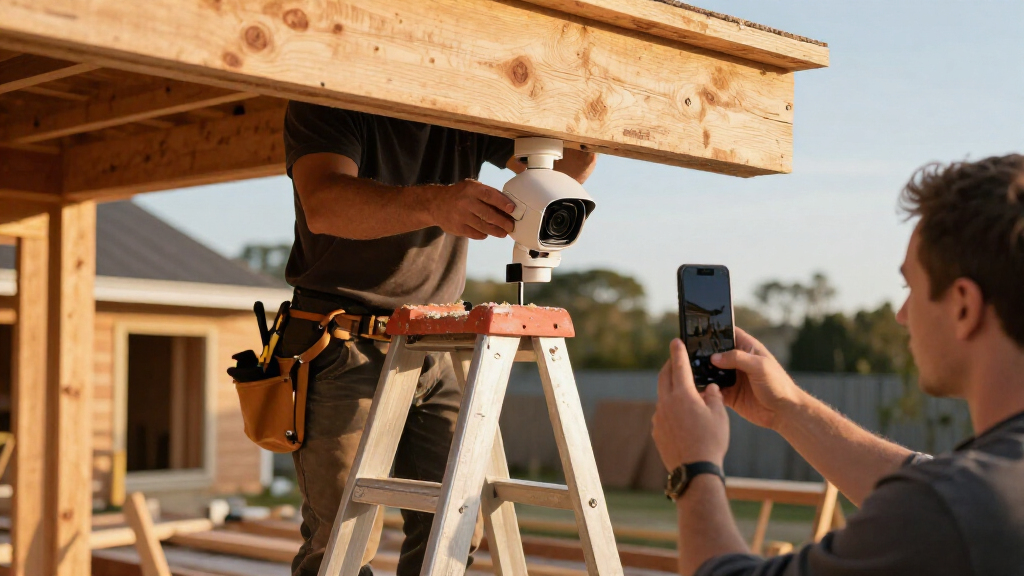
Install cameras securely and test the view before relying on them
- Confirm the aim. Stand where the camera will go and check that the view covers the intended entrance or asset without pointing into private areas or directly at a bright light. The aim determines both what the camera records and what it leaves out, so check the edges of the frame as well as the center.
- Secure the mount. Use a bracket suited to the surface and tighten its fasteners to the manufacturer’s specifications. A loose mount can drift when wind, vibration, or site activity shakes it. Even a small change in angle can move a gate or doorway out of the useful part of the image.
- Protect the route. Use weatherproof connections and protect cables from water, abrasion, equipment traffic, and tampering. Plan cable paths so they do not create trip hazards or interfere with work. A damaged cable may cause intermittent faults that are harder to diagnose than a complete failure.
- Set power and connectivity. Confirm the camera receives stable power and maintains a connection at its final location. Test after fastening the camera, since a signal that works during setup can change when equipment or structures block the path.
- Test and document. Check daytime and nighttime images, motion alerts, remote viewing, recording retrieval, and behavior during a connection or power interruption. Record the camera’s location and settings for authorized staff. This shows whether the system can still provide evidence when the conditions are less than ideal.
That sequence turns a quick mount into a useful installation. A camera installed high enough to discourage casual tampering may still need to sit at an angle and distance that capture usable faces. Too high, and it can show the top of a hard hat instead of someone’s features. The best mounting point balances physical protection with the detail required at the target area.
Consider a camera above a side gate. Before tightening the bracket for good, ask a coworker to walk through the frame, stop, and turn toward it. Review the recorded clip on the device you will use to check incidents; a live preview can look sharp while the saved footage looks soft or badly framed. Repeat the check at night, because exposure and lighting can change what the camera captures.
Do not improvise electrical work. If a mains-powered installation requires new wiring, work in an electrical panel, or changes to building services, use a licensed electrician and follow applicable permits and code. De-energize circuits before authorized work, verify they are off with proper equipment, and use appropriate PPE. Keep ladders and tools clear of live conductors and active equipment.
During installation, account for dust and changing work zones. Keep lens caps on until setup is complete, avoid grinding or cutting nearby when you can, and clean the lens before the final image check. A properly aimed camera should capture the event you care about, rather than a perfect view of a light fixture or a dusty smear.
Set alerts so someone knows what to do next
A camera alert only helps when someone is assigned to review it and follow a clear response procedure. Decide who receives alerts, which hours the site is covered, how quickly someone should respond, and who may contact site staff, security, or emergency services. Without that plan, a phone can buzz all night while everyone assumes someone else is watching. Response expectations also affect the system settings: a team that cannot review alerts overnight should not treat an overnight notification as active monitoring.
A small crew might assign the site supervisor as the first contact during the week and a named backup on weekends. A larger site may use a professional monitoring service, with agreed escalation steps for people entering a restricted zone. Set rules for what a reviewer should do: confirm the camera and location, check whether the activity matches a scheduled delivery, record the time, and follow the site’s incident procedure. A named backup matters because a single responder may be unavailable, asleep, or off shift when an alert arrives.
For example, a motion alert beside a material store could come from a late delivery, a subcontractor retrieving tools, or someone who should not be there. A reviewer who checks the live view and site schedule can avoid treating every alert as an emergency. At the same time, the system should preserve the clip so the team can check what happened later. The process balances prompt action with the risk of escalating ordinary work activity as a security incident.
Motion zones and analytics can reduce nuisance alerts when set up carefully. They can also miss activity or misclassify a person, vehicle, animal, or moving equipment. Test the settings with ordinary site activity and changing weather. Don’t treat automated detection as proof that an incident occurred or as a substitute for a human response. When thresholds are too sensitive, alert fatigue can make important notifications easier to overlook; when they are too restrictive, a relevant event may not trigger a notification at all.
Write the escalation steps in plain language and make sure the people on the list still work at the project. Remove former employees and contractors from alert groups and camera accounts. A short call tree and a named backup are more useful than a complicated notification setup no one maintains. Review the process when shifts, site access, or the project team changes.
Protect worker privacy and keep footage access under control
Tell workers, subcontractors, and visitors that cameras operate on site, and check local requirements for workplace surveillance, signs, audio recording, access, and retention. Rules vary by location, and recording audio can trigger separate legal requirements. Avoid areas where people reasonably expect privacy, such as toilets or changing spaces, and aim cameras at security needs rather than routine personal activity. A defined purpose helps the team decide which views are justified and discourages adding surveillance that does not serve site security.
Imagine a camera installed to watch a tool cage also capturing a break area. The security goal does not automatically justify every part of that view. Adjust the angle or camera privacy settings, post clear notice where required, and ask a qualified local adviser or employment professional when the rules are unclear. Minimizing unnecessary footage also reduces the amount of personal information the team must protect and review.
Limit live and recorded access to people who need it for site security. Use unique passwords, multifactor authentication where available, and current software. Review permissions as roles change, remove accounts when a worker or contractor leaves, and protect exported clips as sensitive records. A shared password written on an office whiteboard can turn a useful camera system into an open door. Individual accounts make it easier to revoke access when someone leaves and, where supported, to understand who viewed or exported footage.
Keep a basic log of who accessed or exported footage if your system supports it. Set a retention period and follow it consistently, subject to applicable law and any documented incident hold. Keeping every clip forever may raise privacy and storage concerns without adding practical value to the project. Shorter retention reduces exposure if accounts or storage are compromised, while a period that is too short may leave no footage when an incident is reported later.
Security includes the data as well as the hardware. A locked camera cabinet does little to protect a feed if former staff still have remote logins. Clear notice, restricted permissions, and regular account checks help keep the system focused on protecting the site while respecting the people working there.
Keep coverage dependable with a simple maintenance routine
Inspect the camera system on a schedule and after any major site change, because dust, vibration, weather, and moving materials can quietly spoil a view. Clean lenses with a method suitable for the camera, check mounts and enclosures, inspect cables and weather seals, and confirm each camera still points at its intended area. A dusty lens can turn a crisp gate image into a foggy glow. Regular checks catch gradual degradation before the team needs the footage to investigate an incident.
For a practical weekly check, have an assigned person review a short clip from each critical camera, confirm recording and remote access, and look at alert history for repeated false alarms. Monthly, check storage capacity and retention settings, apply security updates according to the system’s guidance, and review user accounts. Cameras powered by batteries or solar need checks on battery condition, charging, shade, and runtime. These checks test different parts of the system: a live image alone does not prove that footage is being saved or that alerts reach the right person.
Suppose a lumber delivery moves from the north fence to a space beside the site office. That change may block a camera view or make motion alerts fire whenever a forklift passes. Update the site plan, adjust the camera or detection zone, and test the new view rather than assuming the old setup still works. A quick review after changes can prevent a blind spot from persisting for weeks.
Keep an incident and outage log with dates, affected cameras, site changes, and repairs. If the same camera loses signal after heavy rain, the pattern can point to a connection or weatherproofing problem. The log also helps the team spot recurring blind spots and improve coverage before the next incident. It can help distinguish a one-off network interruption from a fault that needs a lasting repair.
Test the full chain, not just the picture. Confirm the footage records, can be retrieved, and reaches the right person when an alert occurs. Treat updates, access reviews, lens cleaning, and battery checks as routine site tasks, just like checking a lock or replenishing a first-aid kit. A camera system is dependable only when it continues to produce accessible, useful footage through ordinary wear and changing site conditions.
Frequently Asked Questions
How many cameras does a jobsite need?
There is no fixed number; it depends on the site’s shape, entrances, valuable assets, blind spots, and the detail you need. Draw a coverage plan first, then add cameras where they close a meaningful gap. A small site may need a few carefully aimed views, while a large site may need overlapping coverage at critical gates.
Where should jobsite security cameras go?
Start with entrances, vehicle gates, equipment and material storage, and known blind spots. Aim cameras to capture useful detail at access points and check that buildings, scaffolding, or stored materials do not block the view. Respect privacy requirements and avoid places where people expect privacy.
Can wireless cameras work reliably on a construction site?
They can when signal strength and power are dependable at the final mounting locations. Test the connection at each camera rather than assuming the site office has good coverage everywhere. For critical views, check whether local recording or another backup keeps footage available during an outage.
Do jobsite cameras need internet to record?
Not always. Some systems can record to local storage without internet, while remote viewing and cloud recording generally require a connection. Check what happens to recording and alerts during a service interruption before relying on the setup.
How long should jobsite camera footage be kept?
Set retention based on project policy, storage capacity, incident response needs, and applicable law. Confirm the system can meet the chosen period and check whether cloud storage has plan limits or added costs. Protect any footage held for an incident and remove ordinary footage according to your retention rules.
Is it legal to record workers on a jobsite?
Requirements vary by location and may cover notice, purpose, audio, access, and retention. Tell workers and visitors about camera use as required, avoid private areas, and check local rules before enabling audio recording. Ask a qualified local professional when workplace surveillance requirements are unclear.
Conclusion
Build your camera plan around the evidence you need and the person who will act on an alert. Test every view at its real location, then keep checking it as materials, equipment, and site phases move around. Cameras work best alongside locks, lighting, access procedures, and privacy safeguards.
Before you call the system ready, watch a person walk through the gate on a recorded night clip. If you can see what matters, you have a useful layer of security; if you only see a shadow crossing the gravel, adjust the view while the site is still quiet.