TL;DR

Get business pricing on tools and workshop supplies
- Business-only prices and quantity discounts
- Tax-exempt purchasing
- Multiple users, one account, clear invoices
A laser distance meter sends a beam to a target and calculates distance from the returning signal, but the displayed result depends on setup as much as the tool. Choose a meter with enough range, set the correct reference point, brace it against a stable surface, and repeat important readings. Check difficult targets and critical dimensions with a tape or another suitable method.
A laser distance meter can give you a room measurement in seconds, then quietly add the error from a reference point you forgot to set. That little mismatch can leave a cabinet run short, a flooring order off, or a new partition out of square.
A laser distance meter, also called a laser measure or laser distance measurer, calculates distance by sending out a beam and analyzing the reflected signal. This guide shows you how to choose a meter, set it against the work, handle tricky surfaces, and check the readings that matter before you cut or order material.
You’ll also see where the tool earns its place and where a tape, a second check, or a qualified professional makes more sense. The goal is simple: a fast reading you can trust enough to act on.
Set the front, rear, or tripod reference to match how the meter sits at the starting point.
Choose a rated range with room to spare, and treat displayed digits as a result of both the tool and the setup.
Brace the meter, target a clear surface, and repeat important readings before using them for cuts or orders.
Use area and volume functions for simple shapes; split alcoves and irregular layouts into separate measurements.
Check critical dimensions with a tape or another suitable method, and record units, location, and reference point.
How to Set Up and Use Laser Distance Meters for Accurate Measurements
A laser meter can capture a room in seconds—but the reading is only as useful as its setup. Choose a suitable range, set the correct reference point, hold steady, and repeat the dimensions you’ll use to cut or order materials.
“A rear reference assumes the back of the meter sits at the starting point.”
Match the meter to the work
Published range and accuracy are specifications under stated conditions. Surface, light, distance, movement, and setup all affect the reading you get on site.
Leave a margin
Choose a rated range beyond your longest expected measurement. Check the stated tolerance and treat extra displayed digits as display precision, not proof of real-world accuracy.
Know where it starts
Check whether the model measures from the front, rear, or tripod mount, and how to switch points. A few centimeters of unintended gap can shift every reading.
Plan for the site
For bright or distant targets, a viewfinder or compatible target plate may help. Review environmental limits and useful options such as memory, Bluetooth, area, and volume.
Build a repeatable starting point
Follow the model’s manual for its controls. A deliberate setup makes readings easier to repeat and errors easier to spot.
Check the meter
Check the battery, clean the sensor window with a soft cloth, and select the required units.
Set the origin
Choose front, rear, or tripod reference to match where the instrument will rest.
Brace or mount
Seat it firmly at the marked start. Use a secure tripod for long or repeated spans.
Aim with purpose
Keep the meter aligned with the intended direction and target a clear, stable surface.
Measure, compare, then record
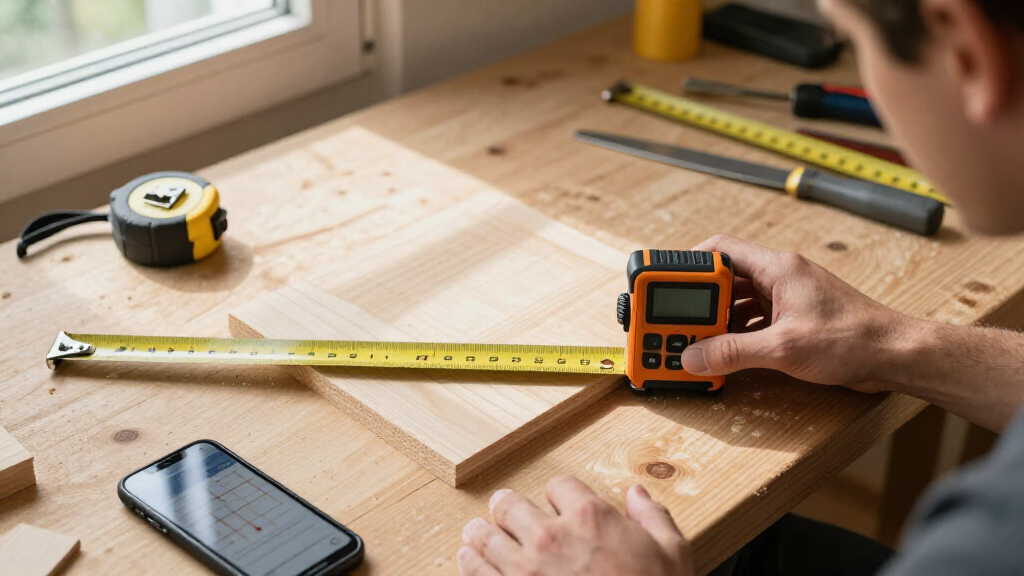
For a basic room reading, place the meter against one wall with the correct reference selected, aim at a clear patch on the opposite wall, and measure while holding it steady.
Keep starts consistent
Measure each dimension from a repeatable wall position. Keep the beam clear of furniture, people, glass, and anything else that could intercept it.
Find the cause
Check for a shifted meter, a changed target spot, or an obstruction crossing the beam. Repeat with the same setup; don’t average mismatched readings automatically.
Make results traceable
Record units, wall or location, and reference point. Before a flooring order, measure alcoves or chimney breasts as separate parts of the layout.
Help the beam return cleanly
The meter reports the surface reached by its beam. Difficult light, materials, movement, and obstructions can make the intended target hard to measure reliably.
When the reading wanders
Try a flat, matte target area, brace the tool, or use a compatible plate as directed by the maker. Include the plate’s position in your measurement setup.
- Bright sun: use a digital viewfinder if available.
- Dark or glossy: choose a stable, matte patch where possible.
- Glass: confirm whether the beam returns from the pane or beyond it.
- Long span: stabilize the meter; hand movement matters more.
- Blocked line: clear the path or change measurement method.
- Weather: stay within the stated operating limits.
Let the tool calculate; verify the inputs
Area uses length and width; volume adds height. These functions handle arithmetic, but they cannot correct inaccurate inputs or describe an irregular room from a single rectangle.
Simple shapes
Measure length and width from consistent points. Split alcoves and offsets into separate sections, then combine the areas.
Check each dimension
Measure the added height or use an indirect function only as the manual describes. Confirm the geometry and setup before relying on the result.
Cross-check critical work
Check dimensions that affect cuts, orders, or fit with a tape or another suitable method. Seek a qualified professional when the task calls for one.
From setup to a result you can use
Choose a meter that can handle your longest measurement
Choose a laser distance meter with a rated range beyond the longest distance you expect to measure, and check its stated accuracy, reference options, and environmental limits. The number on the box is a specification, not a promise that every surface and setting will produce that result. A basement room and a sunny exterior wall ask different things of the same tool.
For a typical interior renovation, range may be less important than a clear display and a rear reference that sits flush against a wall. If you measure across a large open space or outdoors, a digital viewfinder or camera can help you locate the aiming point when daylight washes out the tiny red dot. A compatible target plate can help on a dark or uneven surface, provided you account for where the plate sits.
Check the accuracy tolerance in millimeters or as a plus/minus figure. If a device displays 4.286 meters, those last digits do not mean your real-world setup is accurate to a millimeter; movement and the target can affect the result. For repeated measurements, look for memory or Bluetooth transfer, but check that any app still supports your phone and workflow.
On a dusty, damp, or rough jobsite, read the maker’s stated protection and operating limits before you bring the meter out. A DIY-grade unit can be fine for a bedroom repaint, while frequent exterior layout work may justify a more rugged model—or a rental if you need a specialty instrument only once. The right choice starts with how you’ll hold it.
Popular right now

DeLonghi Rivelia Automatic Espresso Machine Bundle with Grinder and Frother, Beige

Shark Navigator Lift-Away Upright Vacuum (NV360)

Dreame L40 Ultra Gen 2 Robot Vacuum and Mop
As an affiliate, we earn on qualifying purchases.
Set the reference point before you measure
Set the meter’s reference point to match the surface that will touch the starting point: usually the front, rear, or a tripod mount. The setting tells the tool where the measurement begins. If it assumes the rear of the meter rests on a wall but you hold it several centimeters forward, the display includes that gap.
Before your first reading, check the battery, wipe the lens or sensor window with a soft clean cloth, and choose the units you need. Read the model’s manual for the button sequence; controls differ, and guessing at a small icon while you’re on a ladder is a poor way to start. Set the reference point, then test it against a short, familiar dimension.
For example, put the back of the meter firmly against one wall and measure to the opposite wall. If you then hold it in midair and keep the rear reference selected, the second reading starts from the device’s rear, not from the wall. That is a systematic setup error: every measurement from that position can shift by the same amount.
For long measurements or a run you’ll repeat, mount the meter securely on a compatible tripod and check whether the tripod reference is available. Keep the instrument aligned with the intended direction. A solid setup is the foundation; next, make the beam land where you mean it to.
Take a room measurement you can repeat
To measure a room, place the meter against one wall with the correct reference point selected, aim at the opposite wall, and press the measure button while holding the tool steady. Keep the beam on a clear part of the wall, away from furniture, people, glass, and anything else that could catch or redirect it.
- Pick a consistent starting point. Seat the meter against the wall or brace it at a marked location.
- Aim at a clear target. Choose a flat, stable patch on the opposite surface.
- Take the reading and repeat it. Compare the second result with the first before recording.
- Measure each dimension separately. Note which wall and reference point each number belongs to.
Say you’re measuring a living room before ordering flooring. Take length and width from consistent wall positions, then check whether the room has an alcove or chimney breast that needs its own measurements. The device can calculate area, but a single length and width won’t describe an irregular floor plan accurately.
If two readings disagree, don’t average them automatically. Check whether the meter shifted, whether the beam landed on a different spot, and whether a chair or person crossed the beam. Repeat until the setup produces consistent results, then write down the location and units so someone else can follow your notes.
Get a clean reading from sunlight, glass, or dark surfaces
For a reliable reading, the beam needs a clear line to a stable target that reflects enough of its signal back to the meter. Bright sunlight can make the aiming point hard to see, long distances can weaken the return, and dark, glossy, angled, or uneven surfaces can send the beam astray. The tool measures the surface it reaches, not the one you intended.
Outdoors, use a digital viewfinder if your model has one, and brace the instrument or mount it on a tripod when distance makes hand movement obvious. A compatible target plate may improve the return from a difficult surface. Follow the device instructions and record how you positioned the plate, because its location becomes part of your measurement setup.
Glass deserves special care. The beam may reflect from the glass, pass through it, or return from something behind it. If the dimension ends at the glass, aim and measure in a way the manual supports, or use a tape where practical; don’t assume a reading across a window represents the pane.
On a renovation site, a dark painted wall at the end of a hallway may produce jumpy readings. Try a flat, lighter target area or a suitable plate, then repeat the measurement. If the beam keeps wandering, change methods. A laser can’t rescue a line of sight blocked by a stack of doors.
Use area, volume, and height functions with a check
Use the meter’s area function by measuring length and width, and its volume function by adding height; the device does the arithmetic, but it cannot improve inaccurate inputs. These features speed up estimating paint, flooring, or storage space when the surfaces form a simple rectangle or box. Irregular rooms need separate measurements for their sections.
For example, a rectangular room measures 4.2 meters by 3.6 meters, giving an area of 15.12 square meters. If a 0.8-meter-deep alcove runs along part of one wall, measure it as its own shape and add its area rather than pretending the room is one clean rectangle. Your estimate then follows the actual floor instead of the room’s rough outline.
Some meters offer indirect height functions based on geometry, often using multiple readings and a built-in calculation. They can help when you cannot reach a high point directly, but the instrument must stay stable and you must follow the model’s aiming sequence. A small shift between readings can distort the calculated height.
If you can measure a dimension directly and safely, do that before relying on an indirect estimate. Imagine checking a ceiling height before ordering tall built-ins: a direct measurement with a stable ladder and a helper may be more dependable than a rushed calculation from across the room. For work at height, use safe access equipment and don’t stretch from a ladder to chase a laser dot.
Check the numbers before they become cuts or orders
For dimensions that affect a cut, cabinet order, or material quantity, repeat the reading, record the setup, and cross-check with a tape or another suitable method. A stable set of repeated readings gives you more confidence than trusting every digit on the screen. If the readings conflict, find the cause before you turn the number into a cut line.
Record the measurement location, units, and reference point alongside the result. “3.42 m” is easy to misread later; “north wall to opposite plaster face, rear reference, 3.42 m” tells you where the number came from. On a busy renovation, clear notes prevent a coworker from measuring from the skirting board while you measured from the finished wall.
Keep the sensor window clean and store the meter as the manufacturer directs. Dust on the window, a battery warning, or a knock from a tool bag can complicate reliable use. If the device produces inconsistent readings, consult its troubleshooting guidance. Don’t assume you can calibrate every model in the field; follow the maker’s service procedure.
For a cabinet run, measure the wall in more than one place if it may bow, and confirm the tightest point with a tape before finalizing the order. If the work involves structural changes, electrical or gas systems, or roof work, use a licensed professional and follow applicable permits and code requirements. Switch off power before work near electrical components, and wear suitable PPE for the site.
Frequently Asked Questions
Are laser distance meters more accurate than tape measures?
They can provide fast, repeatable readings over long distances, but real accuracy depends on the model, setup, target, and surroundings. A tape can be a better choice for short dimensions, flexible surfaces, or a blocked line of sight.
Why do I get a different reading each time?
The meter may move, the beam may hit a different point, or the target may not return the signal consistently. Check the reference setting, brace the tool, aim at a clear surface, and repeat the measurement.
Can I use a laser distance meter outdoors?
Many models work outdoors, but sunlight can hide the aiming point and long distances can make the return signal less reliable. Check the rated range and operating limits; a viewfinder, tripod, or compatible target plate may help.
Will a laser measure work through glass?
Don’t count on it. Glass can reflect or pass the beam, so the meter may return a reading from the pane or a surface behind it. Use a method suited to the surface you need to measure.
What does the front or rear reference setting mean?
It tells the meter which edge or mounting point counts as the start of the measurement. Select the setting that matches where the device rests, then verify it before recording dimensions.
Can a laser distance meter measure ceiling height indirectly?
Some models estimate height from multiple readings and built-in geometry. Follow the model’s sequence, keep the meter steady, and use a direct measurement when you can access the point safely.
Can I use one to mark a legal property boundary?
A handheld laser measure can help with many building dimensions, but it is not automatically suitable for surveying or defining a legal boundary. Use qualified surveying help and equipment suited to that work.
Conclusion
A laser distance meter is at its best when you give it a stable starting point, a clear target, and a repeatable setup. Set the reference correctly, take a second reading for work that matters, and cross-check dimensions before they become a cabinet order or a cut in expensive material.
Remember what the screen can’t tell you: a crisp number can still describe the wrong surface. Make the beam land where the work ends, and your measurements will be worth building on.